> For the complete documentation index, see [llms.txt](https://docs.verge.io/llms.txt). Markdown versions of documentation pages are available by appending `.md` to page URLs; this page is available as [Markdown](https://docs.verge.io/knowledge-base/zh/automation-api/automated-task-example-webhook.md).
# 自动化任务示例 - 在同步错误时发送 Slack 频道和电子邮件告警
自动化示例,展示在遇到同步错误时发送电子邮件告警和 Slack 频道通知的具体配置。
## 在同步错误时发送 Slack 频道通知和电子邮件警报
{% hint style="info" %}
**要点**
* 该 ***VergeOS 任务引擎*** 使您能够自动化操作,这些操作可由特定的系统条件、事件或计划时间触发。通过使用模块化、可重复使用的组件(任务、事件、计划和 Webhook),您可以轻松配置适合您环境的自动化。
* 以下示例演示了任务、事件和 Webhook 如何协同工作,以便在同步操作产生任何错误时自动同时发送警报(Slack 频道和电子邮件)。
{% endhint %}
## 使用场景
DR/BC 服务提供商的管理员需要在夜间同步作业遇到错误时立即收到通知。尽早通知可让他们有时间进行调查并尝试修复,从而提高他们能够重新启动同步并在可用同步窗口内完成它的可能性。
该公司使用多个冗余告警系统来通知管理员关键问题:一个系统通过电子邮件发送警报,而另一个则向专用的 Slack 频道发布消息。
使用 VergeOS 任务引擎组件,管理员可以在任何重要的同步作业报告错误时,立即在这两个系统中触发警报。该自动化由一个 webhook、两个任务和一个事件组成。以下步骤将带您完成完整配置:
{% hint style="info" %}
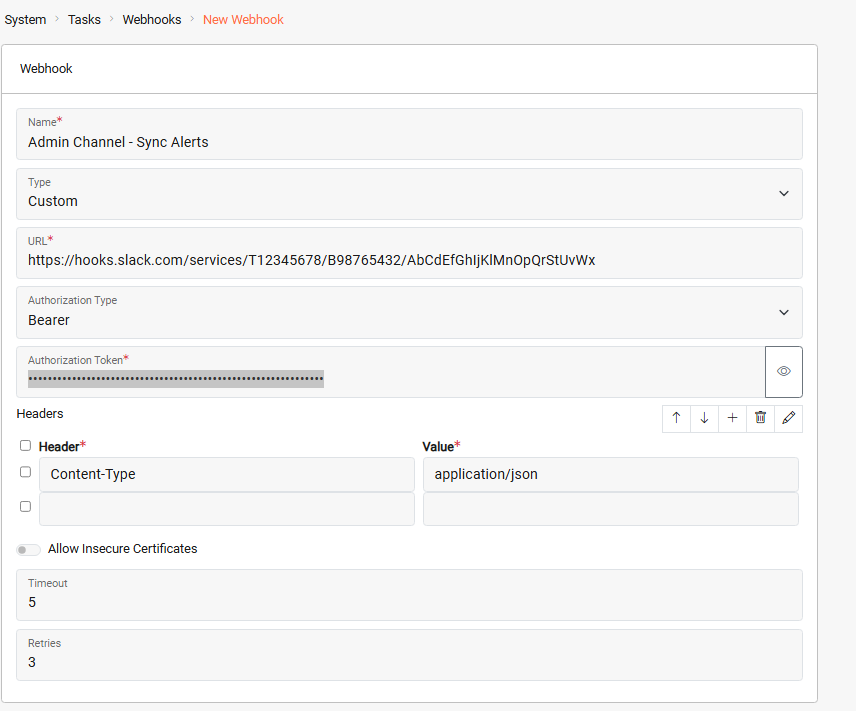
**1. 配置 Webhook**
Webhook 定义了外部 Slack 系统所需的目标 URL 和身份验证方法。
***系统 > 任务仪表板 > 新建 Webhook***
 {% endhint %}
{% hint style="info" %}
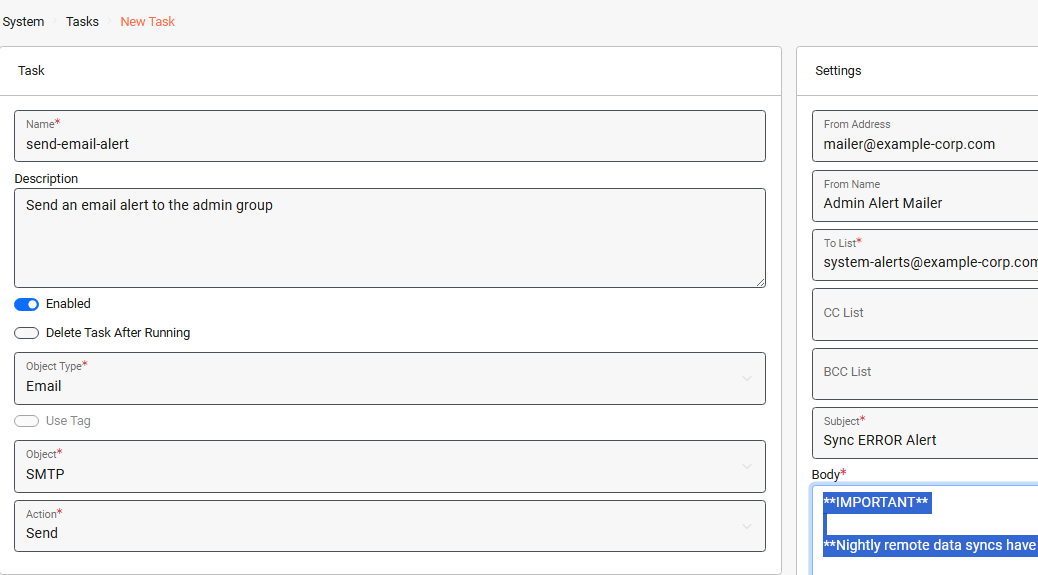
**2. 创建发送电子邮件的任务**
此任务定义将要发送的电子邮件警报。
***系统 > 任务仪表板 > 新建任务***
{% endhint %}
{% hint style="info" %}
**2. 创建发送电子邮件的任务**
此任务定义将要发送的电子邮件警报。
***系统 > 任务仪表板 > 新建任务***
 {% endhint %}
{% hint style="info" %}
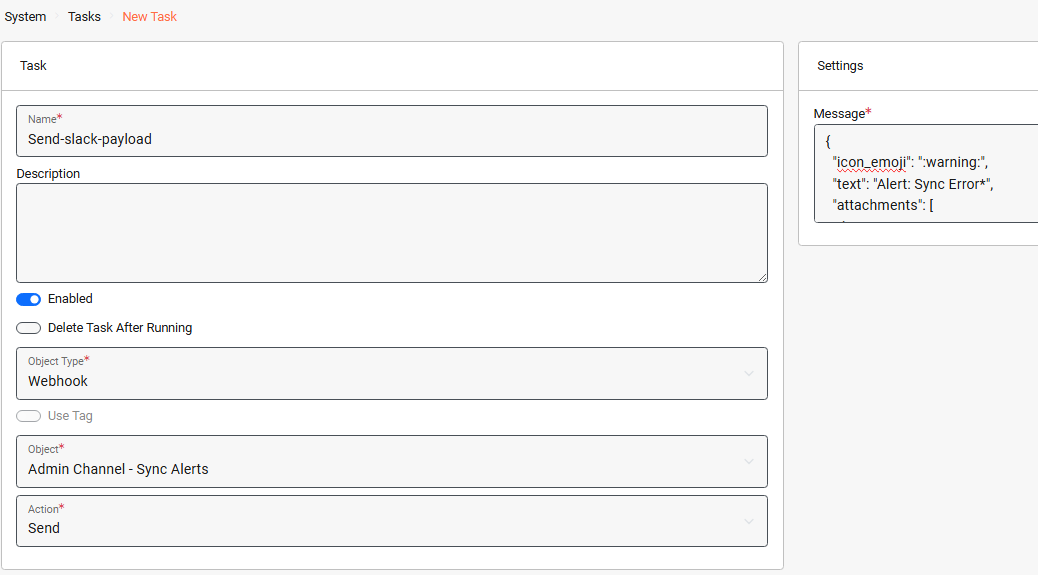
**3. 创建发送 Webhook 的任务**
此任务定义将通过 webhook 发送到 Slack 的消息负载。
***系统 > 任务仪表板 > 新建任务***
{% endhint %}
{% hint style="info" %}
**3. 创建发送 Webhook 的任务**
此任务定义将通过 webhook 发送到 Slack 的消息负载。
***系统 > 任务仪表板 > 新建任务***
 {% endhint %}
{% hint style="info" %}
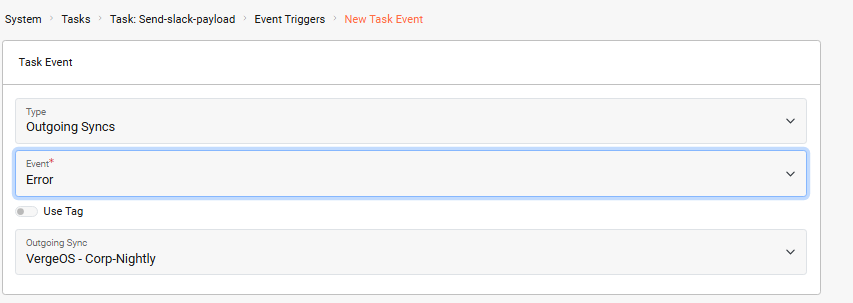
**4. 为 *****发送-slack-payload***** 任务**
分配事件触发器后,我们就可以指定将触发该任务的条件(同步错误)。
从 *发送-slack-payload* 任务仪表板: ***事件触发器 > 新建***
{% endhint %}
{% hint style="info" %}
**4. 为 *****发送-slack-payload***** 任务**
分配事件触发器后,我们就可以指定将触发该任务的条件(同步错误)。
从 *发送-slack-payload* 任务仪表板: ***事件触发器 > 新建***
 {% endhint %}
{% hint style="info" %}
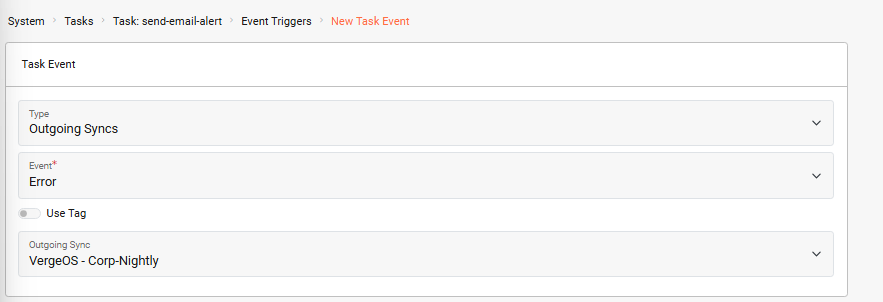
**5. 为 *****“send-email-alert”***** 任务**
我们将相同的事件触发器应用于此任务,以便在出现同步错误时也发送电子邮件警报。
***系统 > 任务仪表板 > 任务 >*** 选择 *send-email-alert* 任务 ***> 事件触发器 > 新建***
{% endhint %}
{% hint style="info" %}
**5. 为 *****“send-email-alert”***** 任务**
我们将相同的事件触发器应用于此任务,以便在出现同步错误时也发送电子邮件警报。
***系统 > 任务仪表板 > 任务 >*** 选择 *send-email-alert* 任务 ***> 事件触发器 > 新建***
 {% endhint %}
此自动化可确保在同步作业遇到错误时立即通知管理员,使他们能够迅速采取行动,并在同步窗口关闭前获得解决问题的最佳机会。
{% hint style="success" %}
**基于多个对象的触发器**
在此示例中,触发器绑定到一个单独的出站同步。如果您希望同一个触发器适用于多个,甚至所有出站同步作业,请为这些同步分配一个共享的 [标签](/run-the-platform/zh/xi-tong-guan-li/tags.md) 。然后,您可以将触发器配置为在任何带有该标签的同步产生错误时触发。
{% endhint %}
## 故障排除
{% hint style="warning" %}
**常见问题**
* **Webhook 未触发**:请验证 webhook URL 是否正确,并确认外部服务(Slack)可从您的 VergeOS 环境访问。
* **未收到电子邮件**:检查 SMTP 设置是否已在 系统 > 设置 > SMTP 下正确配置。
* **事件触发器未激活**:确保触发器已分配给正确的同步对象,并且事件类型已设置为“错误”。
{% endhint %}
## 其他资源
* [任务引擎概览](/automate-protect-and-extend/zh/zi-dong-hua/task-engine.md)
* [配置 Webhook](/automate-protect-and-extend/zh/zi-dong-hua/webhooks.md)
* [使用标签](/run-the-platform/zh/xi-tong-guan-li/tags.md)
* [SMTP 配置](/run-the-platform/zh/xi-tong-guan-li/smtp.md)
## 反馈
{% hint style="info" %}
**需要帮助吗?**
如果你需要进一步帮助或对本文有任何疑问,请随时联系 [VergeOS 支持团队](/overview/zh/support-and-services.md).
{% endhint %}
---
# Agent Instructions
This documentation is published with GitBook. GitBook is the documentation platform designed so that both humans and AI agents can read, navigate, and reason over technical content effectively. Learn more at gitbook.com.
## Querying This Documentation
If you need additional information that is not directly available in this page, you can query the documentation by asking a question.
Perform an HTTP GET request on the following URL with the `ask` and `goal` query parameters:
```
GET https://docs.verge.io/knowledge-base/zh/automation-api/automated-task-example-webhook.md?ask=&goal=
```
`ask` is the immediate question: it should be specific, self-contained, and written in natural language.
`goal` is what the user is ultimately trying to achieve, the reason they need the answer. Sharing it helps GitBook give you a better, more relevant answer. A goal is most helpful when it describes the outcome the user wants rather than restating the question. For example, with `ask=how do I create an API token`, a goal like `automate deployments from our CI pipeline` lets GitBook tailor the answer to that use case.
The response will contain a direct answer to the question and relevant excerpts and sources from the documentation.
Use this mechanism when the answer is not explicitly present in the current page, you need clarification or additional context, or you want to retrieve related documentation sections.
{% endhint %}
此自动化可确保在同步作业遇到错误时立即通知管理员,使他们能够迅速采取行动,并在同步窗口关闭前获得解决问题的最佳机会。
{% hint style="success" %}
**基于多个对象的触发器**
在此示例中,触发器绑定到一个单独的出站同步。如果您希望同一个触发器适用于多个,甚至所有出站同步作业,请为这些同步分配一个共享的 [标签](/run-the-platform/zh/xi-tong-guan-li/tags.md) 。然后,您可以将触发器配置为在任何带有该标签的同步产生错误时触发。
{% endhint %}
## 故障排除
{% hint style="warning" %}
**常见问题**
* **Webhook 未触发**:请验证 webhook URL 是否正确,并确认外部服务(Slack)可从您的 VergeOS 环境访问。
* **未收到电子邮件**:检查 SMTP 设置是否已在 系统 > 设置 > SMTP 下正确配置。
* **事件触发器未激活**:确保触发器已分配给正确的同步对象,并且事件类型已设置为“错误”。
{% endhint %}
## 其他资源
* [任务引擎概览](/automate-protect-and-extend/zh/zi-dong-hua/task-engine.md)
* [配置 Webhook](/automate-protect-and-extend/zh/zi-dong-hua/webhooks.md)
* [使用标签](/run-the-platform/zh/xi-tong-guan-li/tags.md)
* [SMTP 配置](/run-the-platform/zh/xi-tong-guan-li/smtp.md)
## 反馈
{% hint style="info" %}
**需要帮助吗?**
如果你需要进一步帮助或对本文有任何疑问,请随时联系 [VergeOS 支持团队](/overview/zh/support-and-services.md).
{% endhint %}
---
# Agent Instructions
This documentation is published with GitBook. GitBook is the documentation platform designed so that both humans and AI agents can read, navigate, and reason over technical content effectively. Learn more at gitbook.com.
## Querying This Documentation
If you need additional information that is not directly available in this page, you can query the documentation by asking a question.
Perform an HTTP GET request on the following URL with the `ask` and `goal` query parameters:
```
GET https://docs.verge.io/knowledge-base/zh/automation-api/automated-task-example-webhook.md?ask=&goal=
```
`ask` is the immediate question: it should be specific, self-contained, and written in natural language.
`goal` is what the user is ultimately trying to achieve, the reason they need the answer. Sharing it helps GitBook give you a better, more relevant answer. A goal is most helpful when it describes the outcome the user wants rather than restating the question. For example, with `ask=how do I create an API token`, a goal like `automate deployments from our CI pipeline` lets GitBook tailor the answer to that use case.
The response will contain a direct answer to the question and relevant excerpts and sources from the documentation.
Use this mechanism when the answer is not explicitly present in the current page, you need clarification or additional context, or you want to retrieve related documentation sections.